Showing posts with label ERP System. Show all posts

Friday, March 10, 2017

Benefits of Enterprise Resource Planning Software (ERP)

Image result for erp software


Usually, an organization thinks to implement ERP (enterprise resource planning) software to align business objective with latest technology solutions, to enhance customer confidence and stakeholder commitment, to optimum utilization of organization’s resources and assets. Typically, an organization is looking for good enterprise resource planning software with advance features and functions.


Benefits of ERP Software or ERP system introduces efficiency and improvement of its business processes. Good enterprise software helps you to achieve transparency and availability of data across all business functions. It gives right information at the right time to the right people for effective decision making. This decision would be based on accurate information, which will give positive result and increase productivity.


Image result for erp software
ERP System
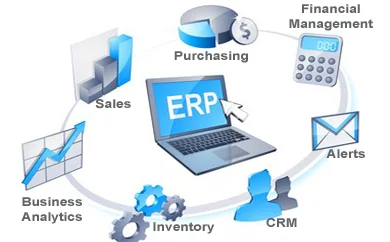
ERP software helps you to optimize your human resource management and asset management. It also improves financial management. Trail balance, balance sheet, cash in hand, cash in bank, top supplier, top customer, ABC analysis, dead stock, WIP (work in progress) and other important reports are ready at any point of time. It helps in achieving better efficiency in organization reporting. ERP software streamlines the supply chain management and improves customer relationship management.


Enterprise resource planning software ensures data security and data scalability: organization can customize the enterprise software according to their requirements. It adopts systems that address changing technologies. It gives better ROI (return on investment). Organization can increase turnover with same human resource. There is a misconception that, ERP is for IT department and they will get more benefits, but it is not true. During implementation and after go-live, IT department responsibility is higher than other department. Proper training gives better output from the new system. Lack of proper training to user results wrong entry and create problem. Top management should understand the need of detailed user training. Ultimately, user is going to use this enterprise resource planning software.


More information about ERP System (Enterprise Resource Planning System), visit us @ www.e-soft.my


Monday, February 11, 2013

ERP Software As An Integration Tool


Enterpriseresource planning (ERP) software is a prerequisite for any organization seeking to become an integrated enterprise. In many respects, ERP provides the structural and architectural foundation upon which an integrated enterprise is built.
In a nutshell, ERP is a tool that enables a company to achieve cross-functional integration, transactional efficiency, and timely and accurate reporting.
For example, when a customer accepts a quotation for a product, sales has an ability to convert that quote into a sales order with a click of a mouse. If the terms of an order require pre-payment, the ERP system can be configured to electronically trigger the activation of accounts receivable invoicing functions. From an operational perspective, the order can become visible to an MRP or DRP2  engine  that issues make and/or buy recommendations. And, those recommendations can be converted into a work order or purchase order at the click of a mouse. These are but a few examples of the myriad of opportunities offered by ERP – opportunities to process transactions quickly, efficiently, and with reduced scope for error.
The above scenarios largely focus on processes that can be automated with ERP. Obviously, an organization still needs people to receive and store product, manage the shop floor, and make business decisions. However, it will need far fewer people (and associated payroll expenses) to perform mundane and time consuming data entry and reconciliation tasks. The system can perform those tasks, with greater efficiency, accuracy, and reliability.
An ERP system can accomplish these tasks with precision because it draws upon a single version of data residing in a common database. For example, in an ERP environment, a company isn’t likely to find itself with a sales order that conflicts with an invoice packet. Both document sets will pull common data from the same source, with minimal need for human intervention.
With data stored in a common database, a company can also position itself to achieve timely and accurate BI (business intelligence) reporting. Gone are the days of needing armies of business analysts to export data from various Excel spreadsheets and Word documents into other spreadsheets. Also gone are the days where analysts spend weeks analyzing data only to make recommendations based on data that has since become stale.
With the volatility of markets and the pace of change, today’s businesses don’t have the luxury of time. Decision-making has to be based on analysis of the most current data.
Fortunately, business intelligence tools provide powerful reporting algorithms that can efficiently slice and dice data. Today’s business analysts are no longer mere data miners and aggregators. They can provide value-add in the form of data analysis, data interpretation, and recommendations thereupon.

Sunday, May 23, 2010

The Path to ERP for Small Businesses

When looking for business software, small companies might fall into the trap of being selected instead of selecting vendors. This usually happens because small companies do not allocate extensive time and resources to the process and do not have selection methodologies, which help decision makers select a product without further investigation.

Not every company takes advantage of a sound software selection methodology. The good news is that other companies have been through complex selection projects before, built sophisticated tools, and developed processes to make it solid, speedy, and successful. This article will broadly review the phases involved in a well-organized software selection methodology. Adhering to a sound methodology helps ensure that you select the right software rather than risk wasting money on all the problems that can arise down the road from a selection, which fails to meet the needs of your organization.

No matter which methodology you use, the process has three main phases: A) research, B) evaluation, and C) selection.

You know what your main activities are; therefore you should have a pretty good idea which processes the best ERP system for your organization should support. But, since there are several ways to do the same thing (e.g., picking and shipping), do you know which way is easier and more efficient for your organization? Remember, just because a process or workflow works well, it does not mean it’s the best way to do it. You should always find ways to improve a process or workflow.

To make sure you find the best ERP system for you company, you must first understand what processes are the most appropriate for your organization. Appropriate, in this case, means suitable for your industry, but also efficient for your company (sometimes processes are defined along the way by people who try to make their life easier, not always including the others) Defining workflows for the major activities of your company will help you better define what you should expect an ERP solution to do for your organization.

At the end of the research stage, you should have a pretty good idea of your company’s software requirements and also have a comprehensive list of sources of information where you can find what you need for the next stage—comparable vendors and products best suited for your organization.

Sunday, May 2, 2010

E-Soft ERP System

The E-Soft Realtime ERP Solutions will be targeted to the SMI, with much emphasis given to simplification and easy of use. Thus, the degree of customisation would be higher, means more flexibility to users. The E-soft Software team are specialized in the ERP System because all the team members are having manufacturing background & ISO 9000 system implementation experience. Most of the team members have at least 5 to 10 years working experience in manufacturing environment. Therefore, the implementation of ERP System will be much more realistic and easier. The E-Soft ERP System will also compliance with the ISO9000 standard. Our strong point is our experience & specialization in manufacturing. In fact, besides having working experience in the manufacturing sector, setting up of MRP system to various kind of industries for our clients also provide us the hand on experience in the implementation. Our MRP clients are consist of wide variety of industries from the plastic moulding, plywood, sawn timber, speaker, speaker box, stamping industries, packaging, bonded warehouse, voice coil, cone paper, air-condition, industrial hose to KD Plant. These does not include non-industries business such MLM, pawnshop, workshop and others application. Therefore, we are not only selling the software but value added in consultation and advisory. Since the working flow and management needs to work hand in hand with the application software, therefore in the process of implementation, we will play a role of consultant and advisor in preparing the working procedure and work flow.

We always tried to achieve realtime data collection ever since our implementation of ERP system. Just try to imagine if a finished products have manufactured in production line, going through QC inspection, transfer to store, issue to shipping area, going through QA inspection and finally loading to container, it have come across so many people’s hand. Human error in filling up documents, error in key in entry, missing of documents will happen. Thus, by implementing realtime ERP Solution, all products will be scanned either by barcode, Link machine to PLC to capture production quantity or detect through RfiD tags, the result will input directly to the system. Although, the initial cost by implement the realtime data collection are high, but it’s worth investing because it will eliminate human error and the data are always real time. However, not all industries are suitable to go realtime. It depends from one industry to another.

The E-Soft ERP Modules are consists of:

1. System Manager.

This module shall cover the master files maintenance such as Customer Files, Supplier Files, Item Master Files, Bill Of Material, Price Files Maintenance, Machine Files Maintenance and etc. The setting of user’s rights will be defined in this module, specific in detail for add new record, edit, delete, enquiry as well as printing reports.

System Manager also cover the utilities features which will provide supports and maintenance to the ERP system, for instance Backup Function, Restore Function, special tools such as change code no and so on.

2. Distributions. (Sales Order Processing & Shipping Control System)

The Distributions module covers the Sales Order Processing, Shipping Control System and Customs Control System.

Upon receipt of sales order from customer, the sales order shall be keyed into the Sales Order System, so as to generate a New Order Listing. The necessary information of the sales order shall be captured into

the system such as P/O Number, Customer, P/O Date, Delivery Place, Item code, quantity, unit price, expected delivery date and so on.

Shipping Control System shall maintain the shipping records for the goods sent out to customer. The system shall link to the Sales Order Processing to deduct the order quantity. The system will print the necessary shipping documents such as Delivery Order, Invoice, Packing List, GPB 1, Customs 9, Customs 1 and etc.

3. Warehouse (Material , WIP & Finished Goods Stock Control)

This module covers the stock control of raw material, work in progress (WIP) and also finished product.

This module will monitor the stock movement of the stock throughout the company in various forms either in the form of raw material, wip or finished product. The incoming module shall register any form of incoming input to the stock either from supplier, production and etc. On the other hand, the outgoing module shall records all type of outgoing transaction, either issuing to production floor, shipping to customer, return to supplier and so on.

Stock taking module was provided to enable users to carry out stack taking process. It covers the printing of inventory tag, updating of stock take figure, generate stock variance report, reset opening figure and etc.

Other features such as enquiry on stock balance, transaction, common part, part shortage and obsolete part are also available. It can be viewed on screen or printed out in report format.

In order to achieve real time stock control system, barcode or other technology such as RFiD can be deployed in the warehouse module.

4. Production Planning

This module consists of 2 main areas, namely:

Production Capacity Planning.

Production Scheduling.

Production capacity planning involved the process of calculating the production capacity on a specific period based on machine available against order received.

On the other hand, production scheduling shall allowed users to process the production scheduling, so as to obtain a optimum production schedule.

With production planning module, users can easily maintain customer satisfaction while ensuring conformance to plans and profitability across the enterprise

5. Procurement.

The Procurement Module handles the creating, printing and follows up of purchase orders. The purchase orders may apply to inventoried or non inventoried materials. Also maintained is purchase history and price history.

The purchase order tracking function will enable purchaser to track the purchased materials based on the required date. Upon receipt of material, the purchase order balance shall be updated accordingly.

6. Material Requirement Planning.

The Material Requirement Planning process is designed to make the production schedule replenishment quantities, explode through the bill of materials to create material requirement based on production schedule

7. Quality Control System.

The Quality Control System shall consist of:

IQC (Incoming QC) – all incoming materials shall go through this IQC inspection in order to ensure all materials received are in good order and condition.

On Line QC – This module will capture all On Line QC which is carried out on each product produced by production floor. Production rejects shall be obtained from the production floor and update into the system, in order to analyse the rejection causes.

QA (Quality Assurance) – to enable the sampling check on the outgoing product before delivery to customer. AQL level shall be determined by the management for the sampling size taken.

8. Mould History Control System.

The ability to maintain the history of every mould by calculating the numbers of shots for each mould based on production output.

9. Subcont. Control System.

This module will control the out flow and in flow of semi finished product send to subcontractor for subcont process. The system will be able to show the stock level stored in subcontractor’s site.

10. Audit Trial

This module shall capture all the audit trial of the activities carried out. All new entry, changes, deletion of data can be traced by date, time & users.